---
title: Member Proceeds Detail Report
description: Full Admin and Full Admin Basic Admin users will be able to run the Proceeds Detailed Reports. It is not available for STS only members.
---
[Skip to content](https://knowledgebase.jhspecialty.com/proceeds-reporting#main-content)
English
Show submenu for translations
[More support](https://knowledgebase.jhspecialty.com/kb-tickets/new?hsLang=en)

- [Tickets](https://knowledgebase.jhspecialty.com/tickets-view)
- [Sign out](https://knowledgebase.jhspecialty.com/_hcms/mem/logout)
Open main navigation
Close main navigation
- [Tickets](https://knowledgebase.jhspecialty.com/tickets-view)
- [Sign out](https://knowledgebase.jhspecialty.com/_hcms/mem/logout)
- English
Show submenu for translations
- [More support](https://knowledgebase.jhspecialty.com/kb-tickets/new)
- Contact us
Contact us
How can we help you?
- There are no suggestions because the search field is empty.
1. [MOCE & oDash Knowledge Base](https://knowledgebase.jhspecialty.com/?hsLang=en)
2. [Reports](https://knowledgebase.jhspecialty.com/reports?hsLang=en)
# Member Proceeds Detail Report
## Full Admin and Full Admin Basic Admin users will be able to run the Proceeds Detailed Reports. It is not available for STS only members.
### Introducing the NEW Proceeds Detail Report!
Order proceeds are only calculated once the order is picked up and are not derived from the actual order date.
The first time you run the report it may get blocked by your pop-up blocker. You should be able to allow pop-ups on this domain going forward and then re-run the report.
If you prefer, there is a video tutorial at the bottom of the page.
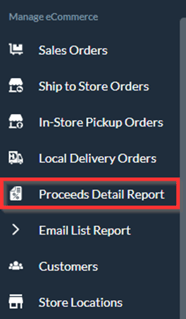
- Under Manage eCommerce you will now see a new module option titled '**Proceeds Detail Report**':
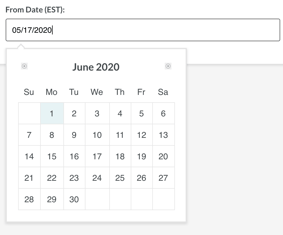
- You can select the Start and End Dates by clicking in the field and choosing the date from the calendar that appears below:
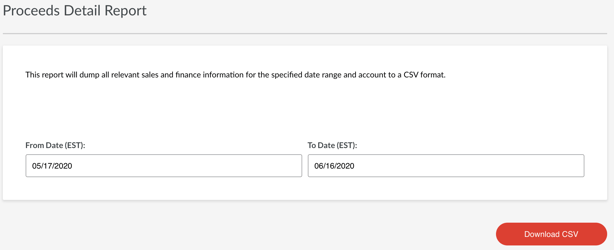
- Once you have selected your dates, click 'Download CSV'

- The report will be generated on your computer in as a spreadsheet:

- Primary Store Number
- Store Member Number
- MOCE Order Number
- DiB Order Number
- Order Date - when the order was placed
- Qualified Date - when the order was marked as picked-up and became qualified for the proceeds.
- You may have an order placed the prior month that is not qualified until the order was marked as picked-up
- Customer Name
- Item Description
- SKU
- Quantity Ordered
- Unit Cost
- Extended Cost
- Unit Price
- Extended Price
- Tax
- Discount
- Total Invoice
- Shipment Method - Ship-to-Store or Ship-to-Address
- Service Fee Amount
- Service Fee by Percentage
- 4.00% indicates that the item was on sale
- 8.00% indicates that the item was full-price
- Adjustment
- Member Proceeds
- The total amount for the date range will appear at the bottom of the spreadsheet
Returns will appear at the bottom of the page and are indicated with a CR at the end of the DiB Order Number (i.e 6790-12345-CR) and also with a negative dollar amount (i.e. -37.53).
Net proceeds are provided monthly in the form of a credit memo.
- [MOCE - Editing](https://knowledgebase.jhspecialty.com/moce-editing?hsLang=en#main-content)
- [Sales Order Module](https://knowledgebase.jhspecialty.com/moce-editing?hsLang=en#sales-order-module)
- [Galleries - Create, Edit and Maintain](https://knowledgebase.jhspecialty.com/moce-editing?hsLang=en#galleries-create-edit-and-maintain)
- [Contact Us](https://knowledgebase.jhspecialty.com/moce-editing?hsLang=en#contact-us)
- [Member & User Modules](https://knowledgebase.jhspecialty.com/moce-editing?hsLang=en#member-user-modules)
- [Logging into your MOCE Admin](https://knowledgebase.jhspecialty.com/moce-editing?hsLang=en#logging-into-your-moce-admin)
- [Pages - Create and Edit ( Standard + )](https://knowledgebase.jhspecialty.com/moce-editing?hsLang=en#pages-create-and-edit-standard)
- [FAQ - ( Standard + )](https://knowledgebase.jhspecialty.com/moce-editing?hsLang=en#faq-standard)
- [Directory Listing](https://knowledgebase.jhspecialty.com/moce-editing?hsLang=en#directory-listing)
- [Blurbs - Editing ( Standard +)](https://knowledgebase.jhspecialty.com/moce-editing?hsLang=en#blurbs-editing-standard)
- [Store Locations - Editing and Adding](https://knowledgebase.jhspecialty.com/moce-editing?hsLang=en#store-locations-editing-and-adding)
- [Employment - Create, Edit, & Maintain](https://knowledgebase.jhspecialty.com/moce-editing?hsLang=en#employment-create-edit-maintain)
- [Menu (Navigation - Footer & Header)](https://knowledgebase.jhspecialty.com/moce-editing?hsLang=en#menu-navigation-footer-header)
- [Resources - Create, Edit, & Maintain](https://knowledgebase.jhspecialty.com/moce-editing?hsLang=en#resources-create-edit-maintain)
- [ōDash](https://knowledgebase.jhspecialty.com/%C5%8Ddash?hsLang=en#main-content)
- [How To Video Series](https://knowledgebase.jhspecialty.com/%C5%8Ddash?hsLang=en#how-to-video-series)
- [Internal Use](https://knowledgebase.jhspecialty.com/%C5%8Ddash?hsLang=en#internal-use)
- [FAQ](https://knowledgebase.jhspecialty.com/%C5%8Ddash?hsLang=en#faq)
- [ōDash FAQ](https://knowledgebase.jhspecialty.com/%C5%8Ddash-faq?hsLang=en#main-content)
- [Email](https://knowledgebase.jhspecialty.com/%C5%8Ddash-faq?hsLang=en#email)
- [Ship-to-Store Information](https://knowledgebase.jhspecialty.com/ship-to-store-information?hsLang=en)
- [Let Us Help](https://knowledgebase.jhspecialty.com/let-us-help?hsLang=en)
- [Login to MOCE](https://knowledgebase.jhspecialty.com/login-to-moce?hsLang=en)
- [MOCE - Popular Topics](https://knowledgebase.jhspecialty.com/moce-popular-topics?hsLang=en)
- [MOCE - Release Notes](https://knowledgebase.jhspecialty.com/moce-release-notes?hsLang=en)
- [Do it Best Internal](https://knowledgebase.jhspecialty.com/do-it-best-internal?hsLang=en)
- [JH Program Mgrs](https://knowledgebase.jhspecialty.com/jh-program-mgrs?hsLang=en)
- [Update Promotions & Pricing](https://knowledgebase.jhspecialty.com/update-promotions-pricing?hsLang=en)
- [Reports](https://knowledgebase.jhspecialty.com/reports?hsLang=en)
- [MOCE Subscription](https://knowledgebase.jhspecialty.com/moce-subscription?hsLang=en)
- [Pick N Pack Mobile App](https://knowledgebase.jhspecialty.com/pick-n-pack-mobile-app?hsLang=en)
- [MOCE Professional Plan Resources](https://knowledgebase.jhspecialty.com/moce-professional-plan-resources?hsLang=en#main-content)
- [General Knowledge](https://knowledgebase.jhspecialty.com/moce-professional-plan-resources?hsLang=en#general-knowledge)
- [Custom Products](https://knowledgebase.jhspecialty.com/moce-professional-plan-resources?hsLang=en#custom-products)
- [BOPIS Articles](https://knowledgebase.jhspecialty.com/moce-professional-plan-resources?hsLang=en#bopis-articles)
- [Training](https://knowledgebase.jhspecialty.com/moce-professional-plan-resources?hsLang=en#training)
- [ECi POS](https://knowledgebase.jhspecialty.com/moce-professional-plan-resources?hsLang=en#eci-pos)
- [Epicor POS](https://knowledgebase.jhspecialty.com/moce-professional-plan-resources?hsLang=en#epicor-pos)
- [TransAct POS](https://knowledgebase.jhspecialty.com/moce-professional-plan-resources?hsLang=en#transact-pos)
- [New Features](https://knowledgebase.jhspecialty.com/new-features?hsLang=en)
- [MOCE - Onboarding](https://knowledgebase.jhspecialty.com/moce-onboarding?hsLang=en)
- [oDash New Features](https://knowledgebase.jhspecialty.com/odash-new-features?hsLang=en)
- [MOCE Information](https://knowledgebase.jhspecialty.com/moce-information?hsLang=en#main-content)
- [Brand Pages](https://knowledgebase.jhspecialty.com/moce-information?hsLang=en#brand-pages)
- [MOCE Updates](https://knowledgebase.jhspecialty.com/moce-updates?hsLang=en)
- [Solutions to Scale](https://knowledgebase.jhspecialty.com/solutions-to-scale?hsLang=en)
- [Internal](https://knowledgebase.jhspecialty.com/internal?hsLang=en)
- [MOCE Knowledgebase](https://jhspecialty-2745682.hs-sites.com/blog)
[](http://jhspecialty.com)
[mailto:email@email.com](mailto:email@email.com)
Copyright © 2026, JH Specialty, Inc.